
OTP WiFi login
OTP WiFi login for your guest network
Guests type a mobile number or email on your WiFi login page, get a one-time password by SMS, WhatsApp or email, and they are online. You get a verified contact for every session instead of a password nobody controls.
The short answer
OTP WiFi login is a guest WiFi sign-in where a guest enters a mobile number or email on the login page, receives a one-time password (OTP) by SMS, WhatsApp or email, and types it in to get online. Wyfy Guest adds OTP login, plus voucher codes, to a venue's guest WiFi, so every session is tied to a verified number or email.
Why venues move from a password to OTP
A shared password answers one question: "can this device join?" It never tells you who did.
A password identifies no one
Everyone who has ever been told the password can use it, from anywhere in range, for as long as it stays the same.
Changing it breaks everyone
Rotating a shared password means reprinting cards and re-telling every regular, so in practice it never changes.
No contact, no record
With a password there is no list of who was online and no way to reach a guest again.
OTP login with Wyfy Guest
Four sign-in methods. You choose which ones each location shows.
SMS OTP
The familiar option: a code by text message to the guest's mobile number. Business SMS in India has to go out on a header and template registered on DLT (Distributed Ledger Technology); how OTP WiFi login works explains why that matters when codes do not arrive.
WhatsApp OTP
The code arrives in WhatsApp, which is already open on most guests' phones in India. WhatsApp OTP vs SMS compares the two.
Email OTP
For guests without a working Indian SIM, such as visitors from abroad, a code to their email address.
Voucher codes
No number or email at all: a code handed over at the front desk, in batches that work for a set time. Vouchers vs OTP explains when each fits.
A verified contact for every login
Each OTP login adds a verified number or email to the venue's own customer list, and the guest log shows who was online, on which device and for how long.
Numbers masked in the dashboard
Staff see a number as +91••••••210. Revealing it takes an OTP sent to the account owner, every time.
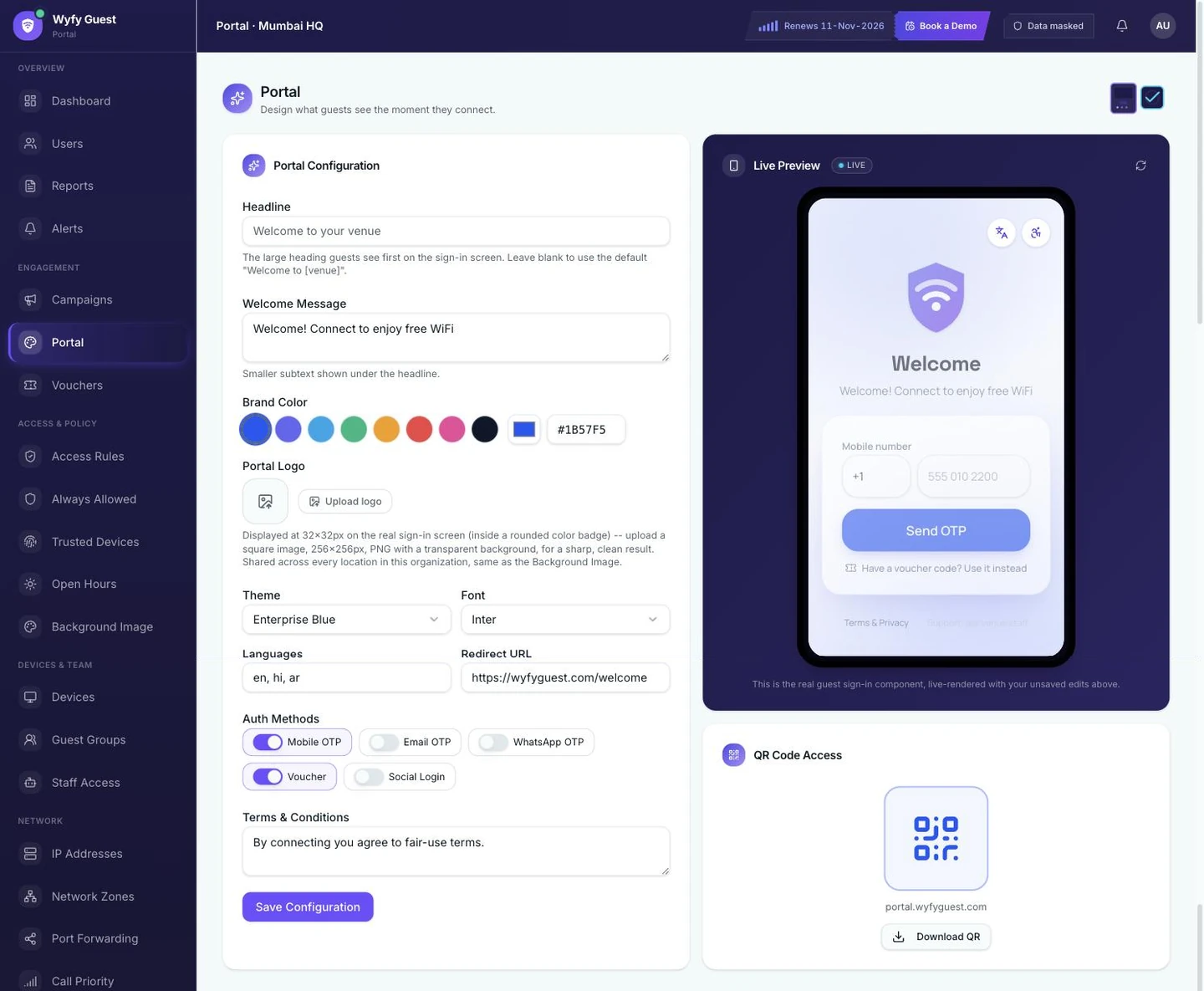
Choosing sign-in methods per location in the live Wyfy Guest Portal editor (demo account). The phone on the right is the real guest login screen.
What the guest sees, step by step
- 01
The guest joins your WiFi
They tap your network name like any other. The network holds their traffic until they log in.
- 02
Your login page opens on its own
Phones detect the login page and pop it up, with your name, logo and the sign-in methods you turned on. No app to install.
- 03
They enter a number or email
And pick SMS, WhatsApp or email, whichever you offer, or type a voucher code instead.
- 04
They type the code and are online
The code is checked against the Wyfy Guest backend, and the device is released under that location's speed and device limits.
Questions
OTP WiFi login, straight answers
What is OTP WiFi login?
OTP WiFi login is a guest WiFi sign-in that uses a one-time password. The guest enters a mobile number or email on the WiFi login page, receives a short code by SMS, WhatsApp or email, and types it in to get online. Because the code goes to a real number or inbox, every session is tied to a verified contact.
Do guests need to install an app for OTP WiFi login?
No. The login page opens in the phone's own browser window as soon as the guest joins the WiFi. The code arrives by SMS, in WhatsApp or by email.
Can I offer only SMS OTP and turn the other methods off?
Yes. You choose which methods to offer, for each location: SMS OTP, WhatsApp OTP, email OTP or a voucher code. Guests only see the ones you turn on.
What if the OTP does not arrive?
The usual causes are an SMS route not registered on DLT, weak mobile signal indoors, or a mistyped or foreign number. Offering WhatsApp OTP, email OTP or a voucher alongside SMS covers most cases. This guide walks through each one.
Can foreign guests without an Indian number log in?
Yes, if the venue offers email OTP or voucher codes. Both work without an Indian SIM.
Does OTP WiFi login work on my existing router?
Often, yes. Our team checks your existing router and tells you whether it is compatible before anything is set up. If it is not, we recommend one that works.

Try OTP WiFi login on your own phone in the demo.
Book a free demo and we'll run the real guest login, SMS, WhatsApp and email, on a live router.
 Book a Demowyfyguest.com/demo