
Guest WiFi for hotels
Hotel guest WiFi with your name on the login page
Replace the password on the key-card sleeve and the router's factory login with a branded guest WiFi login page. Guests sign in with a one-time password or a front-desk voucher, and every property runs from one dashboard.
The short answer
Wyfy Guest is guest WiFi software for hotels in India. It replaces the router's default login with a branded captive portal, lets guests sign in with a one-time password (OTP) by SMS, WhatsApp or email, or a voucher code from the front desk, and gives the hotel per-guest speed and device limits, a guest log and one dashboard for every property.
Where hotel WiFi usually goes wrong
None of these is a network problem. They are what happens when guest WiFi is a router setting nobody owns.
One password for every room
The same password is printed on every key-card sleeve, never changes, and is shared well beyond the guests who are staying. The hotel has no idea who is actually online.
The router's login page is the first thing guests judge
A bare "Click to Connect" page, sometimes with the router maker's logo on it, is what a guest sees right after check-in. It does not look like it belongs to your hotel.
One guest streams, a whole floor slows
Without a per-guest limit, a single heavy download takes the line and the complaint lands at the front desk, which has no way to check.
Guest numbers end up on the reception desk
When WiFi access is handled by hand, phone numbers sit in a register or on a shared screen where any staff member can read them.
What Wyfy Guest does for a hotel
The same product a cafe or a co-working space runs, set up the way a hotel front desk works.
A branded login page for each property
Your headline, welcome message, logo, brand colour and background image, set per location. The lobby and the rooftop bar can look different under one account.
OTP login or a voucher from the front desk
Guests sign in with an OTP by SMS, WhatsApp or email, or with a voucher code handed over at check-in. Vouchers come in batches that work for a set time (an hour, a day, three days), and each batch shows how many codes were used.
Guests from abroad can still get online
A visitor without an Indian SIM can sign in with an email OTP or a voucher code, so no one is stuck waiting for an SMS that will never arrive.
A fair share of the line for every guest
Set a speed limit and a device limit per guest, once per location, so one heavy user cannot slow down a whole floor.
Guest numbers hidden from staff by default
Phone numbers and emails are masked everywhere in the dashboard. Revealing one takes an OTP sent to the account owner, every time.
A guest log you can export
See who was online, on which device and for how long. Download reports on data used, session length, voucher use and internet cost for any date range.
Every login is a guest you can welcome back
Each verified login adds a contact to the hotel's own customer list. After login you can show a banner offer, a short survey, or send guests to a page of your choice.
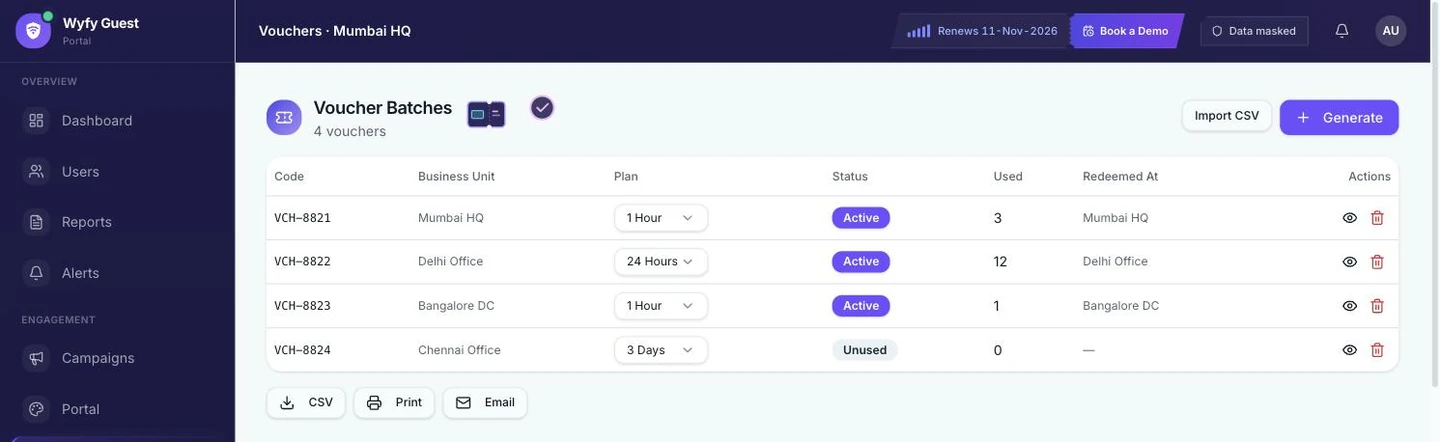
Voucher batches in the live Wyfy Guest dashboard (demo account): each batch has a duration and shows how many codes were used.
How a hotel gets started
- 01
Book a free demo
You see the real dashboard and the guest login running live, and tell us how many locations and routers you have. The demo is free; pricing is a quote built from your locations, routers and support level.
- 02
We check your existing router
Our team checks the router you already have and tells you plainly whether it is compatible. If it is, you keep it. If it is not, we recommend one that works, and you can buy it yourself or have us buy and set it up.
- 03
We set up the login page and the rules
Your headline, logo, colours and sign-in methods, plus per-guest speed and device limits, configured for each location.
- 04
You run it from one dashboard
Every location sits under one account: who is online, the guest log, vouchers, limits and reports, on a laptop or a phone.
Still comparing options? These guides go deeper:
- How to choose a captive portal for a hotel in India: 10 questions
- Connecting a hotel PMS to guest WiFi, and what to ask a vendor
- Hotel WiFi vs cafe WiFi: what is different
Also on Wyfy Guest: Guest WiFi for cafes and restaurants · OTP WiFi login · Captive portal · Pricing
Questions
Hotel guest WiFi, straight answers
What is hotel guest WiFi software?
Hotel guest WiFi software controls how guests get online: the login page they see after joining the network, how they prove who they are (an OTP or a voucher code), how much of the line each guest can use, and the record of who was online. Wyfy Guest does all of that from one dashboard for every property.
Do I need to buy new routers for my hotel?
Not necessarily. Our team checks your existing router first and tells you whether it is compatible. If it is, you keep it and Wyfy Guest adds the login page, access control and management on top. If it is not, we recommend one that works.
How do hotel guests log in to the WiFi?
With whichever methods you turn on for that property: an OTP by SMS, WhatsApp or email, or a voucher code from the front desk. Guests from abroad without an Indian SIM can use email OTP or a voucher.
Does Wyfy Guest connect to my hotel PMS?
No. Wyfy Guest has no connector for a property management system (PMS) today, so it cannot read bookings or follow check-in and checkout. Hotels use OTP login and time-limited voucher codes instead. Our PMS guide explains how these integrations work and what to ask any vendor.
Can front desk staff see guests' phone numbers?
Not by default. Numbers and emails are masked for every staff account, for example +91••••••210. Revealing one takes an OTP sent to the account owner's phone, every time.
How much does hotel guest WiFi software cost?
Wyfy Guest is quote-priced: the quote is built from your locations, routers and support level. There is no free trial, because a router has to be set up first, but a demo is free. The pricing page shows the plan tiers.

See your hotel's login page, live, in a free demo.
We'll show the guest login, vouchers and the dashboard on a real router, and quote your property on the call.
 Book a Demowyfyguest.com/demo