
Guest WiFi for gyms
Gym WiFi that keeps up with the 7 PM batch
Renewals are easier when you can reach the member. Members sign in with a one-time password (OTP). Trial visitors get a voucher that stops by itself. A speed limit per member keeps the floor usable at peak.
The short answer
Wyfy Guest is guest WiFi software for gyms and fitness centres in India. Members sign in with a one-time password (OTP), trial visitors use a voucher code, and each person gets a set speed and device limit. The owner sees who is online and runs every branch from one dashboard.
Where gym WiFi usually goes wrong
A gym's load is predictable, which is exactly why it is worth planning for.
Everyone arrives at the same two times
The morning and evening batches come online together and stream music, workout apps and video classes for the whole hour, not in short bursts.
The password stays on after the membership ends
It is on the reception whiteboard and on every former member's phone, and changing it means telling everyone again.
Early mornings have nobody to fix it
When the line drops during a 6 AM class, the fewest staff are around to notice, let alone restart a router.
How Wyfy Guest works at a gym
Set up around a class timetable and members who come back every week.
A login with your gym's name on it
Members sign in with an OTP by SMS, WhatsApp or email on a page with your headline, logo and colour, set under Login Page > Portal.
Vouchers for trial passes
Create a batch under Guests > Vouchers. Give a walk-in or a trial visitor a code that stops by itself. Its time starts at first use.
A speed limit at peak hours
Under Network > Usage Limits, set a speed limit and devices per member.
WiFi hours that match yours
Under Login Page > Open Hours, set a weekly schedule and a closed message for each location. Outside those hours, guests see your message. Anyone still online is signed off.
Automatic backup internet
Add a second line under Network > Internet Connection. Traffic moves to it by itself when the main line fails its health checks. The same screen shows each line's health and history.
A renewal reminder on a screen members see
Under Marketing > Login Page Offers, show a renewal offer or a new class after login. Then see how many people it was shown to.
See who keeps coming
The Dashboard shows new vs returning guests and your busiest times. Guests > Reports covers footfall and dwell time. Member numbers are masked on staff accounts by default.
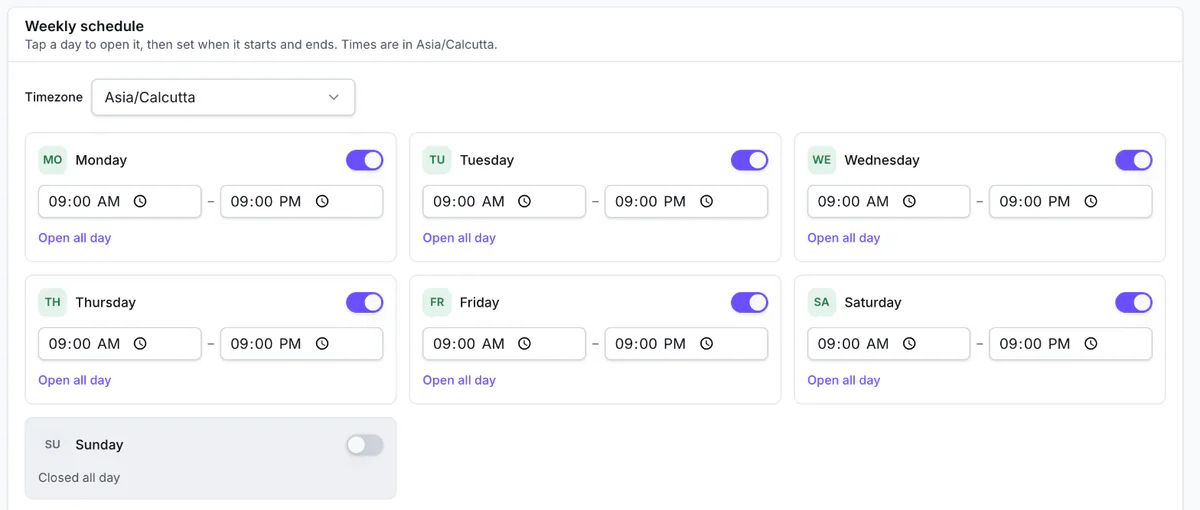
The Open Hours screen in a Wyfy Guest demo account: a weekly WiFi schedule for each location.
How a gym gets started
- 01
Book a free demo
You see the dashboard and the guest login running, and tell us how many locations and routers you have. The demo is free; pricing is a quote built from your locations, routers and support level.
- 02
We check your existing router
Our team checks the router you already have and tells you plainly whether it is compatible. If it is, you keep it. If it is not, we recommend one that works, and you can buy it yourself or have us buy and set it up.
- 03
We set up your login page and limits
Your headline, logo, colours and sign-in methods go in under Login Page > Portal. Speed, device and time limits go in under Network > Usage Limits.
- 04
You run it from one dashboard
Every location sits under one account, on a laptop or a phone. Guests shows who is online. Alerts emails you if a site or an internet line goes down.
Want the longer version? These guides cover it:
- Do gyms have Wi-Fi? What members expect, and how to run it well
- Setting WiFi open hours
- How automatic backup internet keeps guest WiFi up
Also on Wyfy Guest: Guest WiFi for hotels · Guest WiFi for cafes and restaurants · OTP WiFi login · Guest WiFi for retail and malls · Guest WiFi for bank branches · Captive portal · Pricing
Questions
Gym WiFi, straight answers
Should a gym offer WiFi to members?
It helps where the signal indoors is weak, because members use music, workout apps and video classes during a session. A login also gives the gym a verified contact and a screen for renewal offers, which a shared password cannot do.
Why is gym WiFi slow at peak times?
Members arrive in the same two batches and stream for the whole hour. A speed limit per member and a line sized for the peak keep it usable. The Dashboard shows when your peak is.
Can trial visitors use the WiFi without becoming members?
Yes. Hand over a voucher code from reception. Its time starts at first use, and it stops when that time is up.
Can gym staff see members' phone numbers?
Not by default. Phone numbers and emails are masked on staff accounts, and roles under Staff Access limit what each login can see.
Do I need a new router for my gym?
Not necessarily. Our team checks your existing router first and tells you whether it is compatible. If it is not, we recommend one that works.
How much does gym WiFi software cost?
Wyfy Guest is quote-priced: the quote is built from your locations, routers and support level. There is no free trial, because a router has to be set up first, but a demo is free. The pricing page shows the plan tiers.
See your gym's login page in a free demo.
We'll run the member login, a voucher batch and the dashboard on a real router, and quote your branches on the call.