
Guest WiFi for retail and malls
Retail and mall WiFi that holds up on a Saturday evening
Getting a shopper back starts with a login they will finish: one number, one code, your name on the page. Set a speed limit per person. Add a backup line that takes over by itself. Run a store, a chain or a mall's common areas from one dashboard.
The short answer
Wyfy Guest is guest WiFi software for retail stores and shopping malls in India. Shoppers sign in on a branded login page with a one-time password (OTP) or a voucher code, each one gets a set speed and device limit, and a chain or mall operator manages every location from one dashboard.
Where retail and mall WiFi usually goes wrong
A mall's load does not rise slowly. It arrives in bursts, and most setups are planned for the average day.
Fine on Tuesday, unusable on Saturday
A weekend evening can bring several times a weekday afternoon's crowd. Without a limit per person, one video call or download takes the line while everyone else waits.
A long login loses the shopper
Someone walking between stores will not fill in a form. If getting online takes more than a few seconds, the phone goes back in the pocket.
Every tenant looks like the router
A factory login page says nothing about your store or your mall, and it is the first thing a shopper sees after joining.
Nobody knows what the WiFi is doing
When a store manager hears the WiFi is slow, there is usually no record of who was online or whether the line went down.
How Wyfy Guest works at a store or a mall
The store owner gets a contact list and offers. Whoever runs IT gets limits and line alerts. Here is where each of those lives.
A login page with your name on it
Under Login Page > Portal, set a headline and brand colour for each location. The logo and background image are set once per account.
One number, one code
Shoppers sign in with an OTP by SMS, WhatsApp or email. There is no app to install, and you decide whether to ask for a name.
A speed limit for each shopper
Under Network > Usage Limits, set a speed limit and devices per guest for each location. Our bandwidth guide covers sizing the line for the busiest hour.
Automatic backup internet
Add a second line under Network > Internet Connection. Traffic moves to it by itself when the main line fails its health checks. The same screen shows each line's health and history.
Vouchers for desks and promotions
Create a batch under Guests > Vouchers. Hand the codes out at an information desk or a promotion stall. A code's time starts at first use, and the batch shows how many were used.
A reason to come back, after login
Under Marketing > Login Page Offers, show a banner or a short survey, or send shoppers to a page you choose. Then see how many people it was shown to.
See who returns, and when
Guests > Reports covers daily footfall and dwell time. The Dashboard shows new vs returning guests and your busiest times. Roles under Staff Access limit each login by role and location.
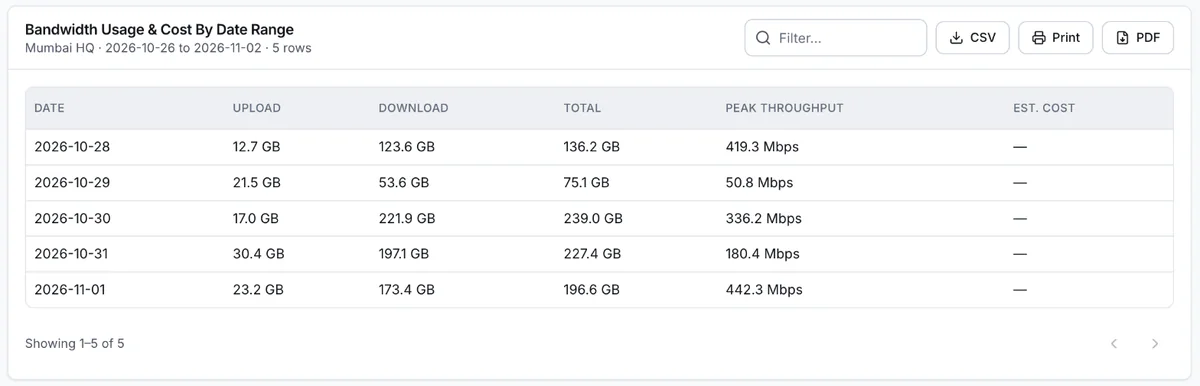
A bandwidth report run in a Wyfy Guest demo account, ready to export as a CSV or PDF, or to print.
How a store or mall gets started
- 01
Book a free demo
You see the dashboard and the guest login running, and tell us how many locations and routers you have. The demo is free; pricing is a quote built from your locations, routers and support level.
- 02
We check your existing router
Our team checks the router you already have and tells you plainly whether it is compatible. If it is, you keep it. If it is not, we recommend one that works, and you can buy it yourself or have us buy and set it up.
- 03
We set up your login page and limits
Your headline, logo, colours and sign-in methods go in under Login Page > Portal. Speed, device and time limits go in under Network > Usage Limits.
- 04
You run it from one dashboard
Every location sits under one account, on a laptop or a phone. Guests shows who is online. Alerts emails you if a site or an internet line goes down.
Want the longer version? These guides cover it:
- Retail store and shopping centre WiFi that stays reliable
- Planning bandwidth for guest WiFi
- Managing guest WiFi across many locations
Also on Wyfy Guest: Guest WiFi for hotels · Guest WiFi for cafes and restaurants · OTP WiFi login · Guest WiFi for gyms · Guest WiFi for bank branches · Captive portal · Pricing
Questions
Retail and mall WiFi, straight answers
What makes WiFi reliable in a shopping mall?
Planning for the busiest hour rather than the average one: a line sized for that peak, a speed limit per person so one download cannot starve everyone else, and a backup line that takes over by itself. Wyfy Guest handles the limits and the switch to backup. The access points and internet lines still have to be sized for your building.
Can each store in a mall have its own WiFi login page?
Yes, within one account each location gets its own headline, welcome message, brand colour and sign-in methods; the logo and background image are shared across that account. A store that needs its own logo needs its own account. A chain or an operator manages its locations from one dashboard.
How do shoppers log in to store WiFi?
With an OTP by SMS, WhatsApp or email, or a voucher code from a desk or a promotion stall. You choose which methods each location shows.
Can store staff see shoppers' phone numbers?
Not by default. Phone numbers and emails are masked on staff accounts, and roles under Staff Access limit what each login can see.
Do I need new routers for my store?
Not necessarily. Our team checks your existing router first and tells you whether it is compatible. If it is not, we recommend one that works.
How much does retail guest WiFi cost?
Wyfy Guest is quote-priced: the quote is built from your locations, routers and support level. There is no free trial, because a router has to be set up first, but a demo is free. The pricing page shows the plan tiers.
See your store's login page in a free demo.
We'll run the shopper login, a voucher batch and the dashboard on a real router, and quote your locations on the call.